Your Canvas Syllabus is About to Get a Huge Upgrade
リアクション
2026年08月08日
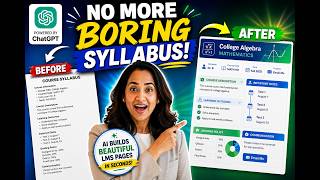
🚀 Stop spending HOURS formatting your Canvas LMS course pages! This custom ChatGPT tool can turn your syllabus and course content into clean, engaging HTML — without you writing a single line of code.
In this video, I show educators how to use my *Code Canvas Rich Content Editor GPT* to transform plain LMS content into visually engaging, organized, and student-friendly course pages.
Upload your syllabus, describe the design you want in simple language, and let AI generate the HTML for you. You can create timelines, tables, accordions, dropdowns, announcements, grid layouts, flashcards, progress bars, and more — then copy the generated HTML into your LMS Rich Content Editor.
🎓 In this tutorial, you'll learn how to:
• Transform a plain syllabus into a professional course page
• Generate LMS-ready HTML with ChatGPT
• Create timelines for tests and important dates
• Build tables, dropdowns, accordions, and announcements
• Customize pages using school or brand colors
• Preview AI-generated course designs before publishing
• Save valuable course-prep time without learning HTML
Whether you teach in **Canvas, Blackboard, Brightspace, Moodle, or another LMS**, this workflow can help you create a more polished and engaging digital classroom.
⚠️ IMPORTANT: Always review AI-generated content and HTML before publishing it to students. Confirm that dates, policies, accessibility, course information, and other details are accurate and meet your institution's requirements.
💬 What course page takes you the LONGEST to build — your syllabus, modules, assignments, announcements, or something else? Tell me in the comments!
👍 If this tutorial helped you, like the video and share it with another educator.
🔔 Subscribe for more practical tutorials on *AI for educators, ChatGPT for teachers, Canvas LMS, instructional technology, course design, and teaching with AI.*
⏱️ YouTube Chapters
Since the transcript doesn’t include timestamps, these are estimated chapter points based on the natural content breaks:
00:00 – Transform Your LMS Without Coding
01:18 – Meet the Code Canvas Rich Content Editor GPT
02:42 – Turn Your Syllabus Into Engaging HTML
05:55 – Create Timelines, Tables & Interactive Course Content
09:20 – Customize Colors, Preview & Start Creating
GPT Link :https://chatgpt.com/g/g-2vocBjV7S-code-canvas-rich-content-editor
🔔 Subscribe to my YouTube channel
https://www.youtube.com/c/BhavaniKola
For more interactive PowerPoint tutorials click on the link below
https://youtube.com/playlist?list=PLLJWtgiCZkAg-dlQaFQucc6G92CRZQJVm
For more videos on Teaching with MS teams Click on the link below
https://youtube.com/playlist?list=PLLJWtgiCZkAhcpDgWJ8YTbcgJKMg9eZAb
For Videos on How to use Canvas click on the link below
https://youtube.com/playlist?list=PLLJWtgiCZkAhETKtA9FFi0JCeP0MsQ2T8
Amazon links to the products I use in the video
Bhavani's Camera -https://amzn.to/3hKfB5w
Bhavani's Microphone - https://amzn.to/3nGOb4k
Bhavani's Tripod--https://amzn.to/2Z2YC7T
Bhavani's Lighting - https://amzn.to/39fQRNI
Bhavani's Tripod Fluid Head- https://amzn.to/3nLtyUr
Bhavani's Alternate Microphone ----https://amzn.to/34niB0v
Bhavani's HUION Inspiroy H1060P-----https://amzn.to/3yIkeno
#bhavanikola #Chatgpt #ai
In this video, I show educators how to use my *Code Canvas Rich Content Editor GPT* to transform plain LMS content into visually engaging, organized, and student-friendly course pages.
Upload your syllabus, describe the design you want in simple language, and let AI generate the HTML for you. You can create timelines, tables, accordions, dropdowns, announcements, grid layouts, flashcards, progress bars, and more — then copy the generated HTML into your LMS Rich Content Editor.
🎓 In this tutorial, you'll learn how to:
• Transform a plain syllabus into a professional course page
• Generate LMS-ready HTML with ChatGPT
• Create timelines for tests and important dates
• Build tables, dropdowns, accordions, and announcements
• Customize pages using school or brand colors
• Preview AI-generated course designs before publishing
• Save valuable course-prep time without learning HTML
Whether you teach in **Canvas, Blackboard, Brightspace, Moodle, or another LMS**, this workflow can help you create a more polished and engaging digital classroom.
⚠️ IMPORTANT: Always review AI-generated content and HTML before publishing it to students. Confirm that dates, policies, accessibility, course information, and other details are accurate and meet your institution's requirements.
💬 What course page takes you the LONGEST to build — your syllabus, modules, assignments, announcements, or something else? Tell me in the comments!
👍 If this tutorial helped you, like the video and share it with another educator.
🔔 Subscribe for more practical tutorials on *AI for educators, ChatGPT for teachers, Canvas LMS, instructional technology, course design, and teaching with AI.*
⏱️ YouTube Chapters
Since the transcript doesn’t include timestamps, these are estimated chapter points based on the natural content breaks:
00:00 – Transform Your LMS Without Coding
01:18 – Meet the Code Canvas Rich Content Editor GPT
02:42 – Turn Your Syllabus Into Engaging HTML
05:55 – Create Timelines, Tables & Interactive Course Content
09:20 – Customize Colors, Preview & Start Creating
GPT Link :https://chatgpt.com/g/g-2vocBjV7S-code-canvas-rich-content-editor
🔔 Subscribe to my YouTube channel
https://www.youtube.com/c/BhavaniKola
For more interactive PowerPoint tutorials click on the link below
https://youtube.com/playlist?list=PLLJWtgiCZkAg-dlQaFQucc6G92CRZQJVm
For more videos on Teaching with MS teams Click on the link below
https://youtube.com/playlist?list=PLLJWtgiCZkAhcpDgWJ8YTbcgJKMg9eZAb
For Videos on How to use Canvas click on the link below
https://youtube.com/playlist?list=PLLJWtgiCZkAhETKtA9FFi0JCeP0MsQ2T8
Amazon links to the products I use in the video
Bhavani's Camera -https://amzn.to/3hKfB5w
Bhavani's Microphone - https://amzn.to/3nGOb4k
Bhavani's Tripod--https://amzn.to/2Z2YC7T
Bhavani's Lighting - https://amzn.to/39fQRNI
Bhavani's Tripod Fluid Head- https://amzn.to/3nLtyUr
Bhavani's Alternate Microphone ----https://amzn.to/34niB0v
Bhavani's HUION Inspiroy H1060P-----https://amzn.to/3yIkeno
#bhavanikola #Chatgpt #ai